August 27, 2026
How to Send a Fax Online Without a Machine
You can send a real fax online from a browser or phone in minutes, without a machine or monthly plan.
Need to know how to send a fax online without a machine in 2026? This guide covers the fastest ways to fax from a computer or phone, compare costs, and save proof of delivery.
If you need to fax a tax form, legal notice, medical record, or signed document, the goal is simple: send it accurately and keep a receipt that proves it went through.
Why Online Faxing Still Matters in 2026
When the clock is running out, the job is simple. Get the file out of your laptop, send it to the right fax number, and save proof that it went through. That is why how to send a fax online still matters for IRS forms, court notices, medical records, immigration paperwork, and government submissions that still expect fax as a normal delivery channel.
Fax survives because it creates a sender-stamped record that the receiver is supposed to keep, and that record matters when deadlines and compliance are on the line. Online faxing keeps that same evidentiary shape, but strips out the hardware, landline, toner, and the drive to a print shop. In practice, you upload a document, a T.38 or fax-over-IP gateway translates it into fax signaling, and the recipient machine prints and timestamps it. The point is not nostalgia, it is proof.
The modern workflow is built around that proof. Fax moved from a hardware-and-phone-line setup to internet transmission in the mid-1990s, and the first internet fax is widely described as being sent in 1996, which matters because it proved you could send from a computer without owning a physical fax machine (eFax history of the fax machine). That model is what online fax services still use today.
Fax also is not a dead channel. Credible reporting cites more than 17 billion faxed documents sent worldwide in a year, and one 2024-2025 industry estimate places the global online fax market at $4.18 billion in 2024 with a projection to 12.52 billion by 2031 (MFax on fax usage and market size). That is not a fringe workaround. It is a mature delivery method that still sits inside major markets and regulated sectors.
A browser-based fax service with accountless checkout is faster than hunting for a machine, and mobile capture means a phone can become the scanner. If you want the mechanics behind that setup, this explainer on how an online fax service works in 2026 maps the basic flow cleanly.
Practical rule: treat the fax as a compliance transaction, not a file transfer. If you cannot save the confirmation, you did not finish the job.
The Best Ways to Send a Fax Online
If you are deciding how to fax online, the good news is that the workflow is simpler than the jargon makes it sound. Strip it down and there are only four real paths, and each one fits a different document, device, and deadline.
Web upload from a laptop
This is the cleanest option for a signed PDF on a desktop. You open a send page, enter the fax number, upload the file, and transmit from the browser. It is the right move when the document is already digitized and you care more about speed and proof than fancy workflow integration.
Email-to-fax
This works when the fax address is wired to the destination number through a provider's inbound relay. It is handy if you live in your inbox, but the downside is obvious, the address itself becomes the routing key, so one typo can send the file to the wrong place or fail without a helpful bounce. If your provider does not support the relay cleanly, skip this method.
Mobile photo capture
This is the best path for a phone photo of a notarized page, a signed waiver, or a piece of paper sitting on a kitchen table. Good mobile fax flows accept HEIC, JPG, and PDF, then convert the image into fax-ready format before dial-out, which prevents the common failure where a camera-roll image reaches the gateway in an unsupported format.
API or app-based sending
Use this for recurring batches, CRM-triggered sends, or office workflows where fax is just one more outbound action. It is the automation option, not the one-off option. If you fax occasionally, do not build software around it.
| Method | Best file format | Device | Best for | Main risk |
|---|---|---|---|---|
| Web upload | PDF, DOC, DOCX | Laptop, desktop browser | One-off filings and clean digital docs | Wrong page count if the file is not normalized |
| Email-to-fax | PDF, attached documents | Email client, phone, laptop | Fast sends from inbox workflows | Silent routing mistakes from address typos |
| Mobile photo capture | HEIC, JPG, PDF | Phone camera, mobile browser | Paper originals, signed pages, field work | Shadowed or skewed photos |
| API or app-based sending | Structured digital files | App, CRM, integration | Repeat volumes and automated flows | Overkill for occasional sends |
For everyday users, the primary choice is web upload or mobile photo. That is where the day-to-day sends happen, and that is where the rest of this guide focuses.
Operator's view: if the document is already a PDF, do not convert it twice. If it is on paper, photograph it properly and send it once.
How to Send a Fax From Your Computer
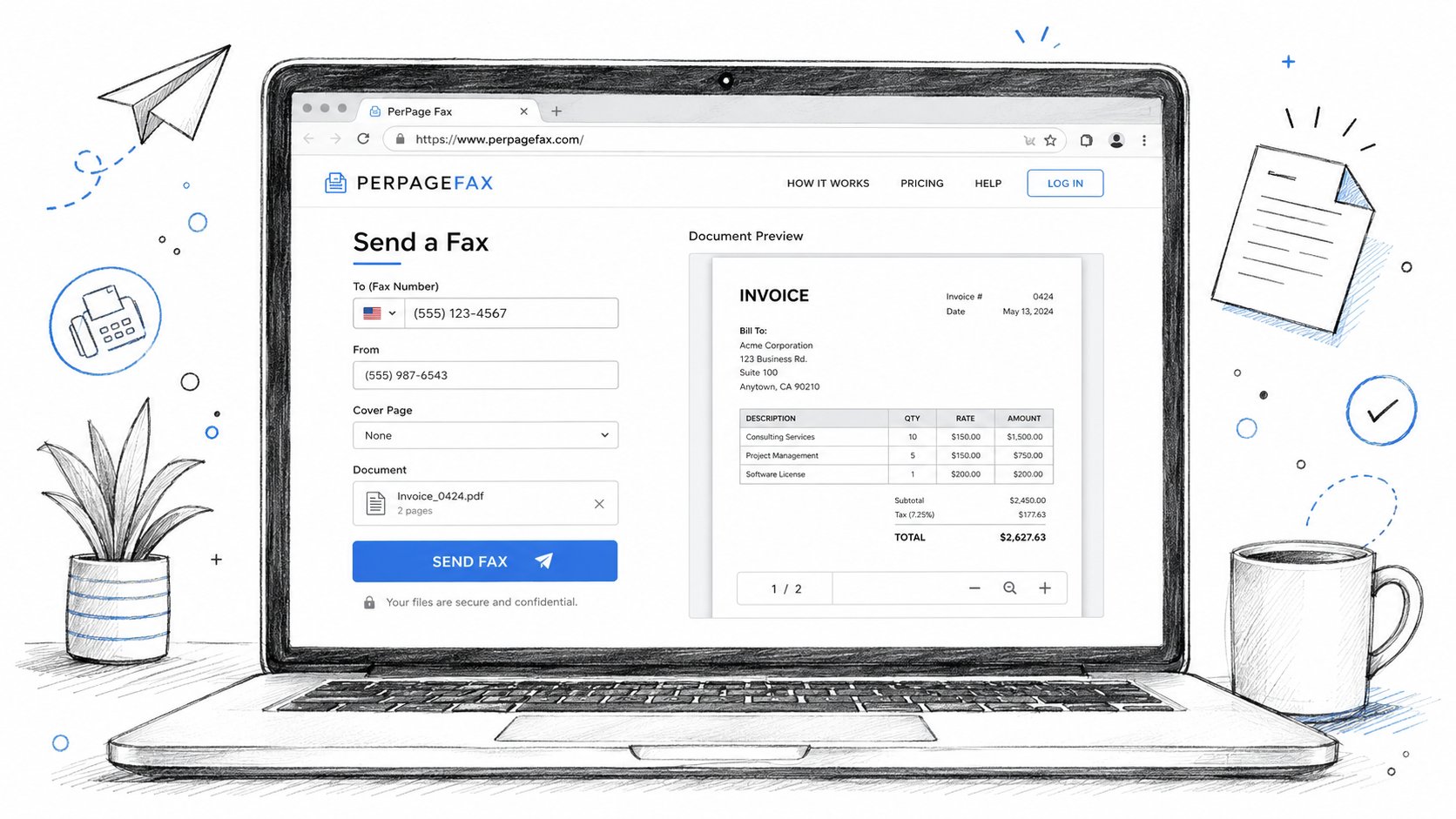
If you want to send a fax from your computer, start by opening the send page and entering the fax number with the country code. For a U.S. number, that looks like +1 212 555 0144, and the area code has to match the intended recipient, not the one your browser guessed from a contact card. If you are faxing across borders, use the full international format, not a half-finished local number.
Upload the file next. A good browser-based service should accept PDF, DOC, or DOCX, and if the recipient expects a cover page for an IRS or court filing, upload that as a separate file or add it in the portal. Most gateways will not invent a cover page for you, and you do not want a generic auto-generated sheet attached to a formal submission.
Check the page count before you pay. Online fax pricing is per page, so a badly split PDF can turn one job into two, and that is a preventable mistake. If the upload screen shows the count is off, fix the file now, not after checkout.
Finish payment with a card or wallet and keep the receipt email. Accountless checkout works well for one-time sends because there is no subscription to cancel later. Leave an email for the receipt and status link, then submit the fax and watch the job move from queued to dialing to sent.
As soon as the status page reports success, copy the link and save it. Then download the confirmation PDF, which should show the destination number, page count, transmission duration, and timestamp. For compliance-sensitive submissions, forward that confirmation file to the recipient by email.
The fax is complete when you can produce a receipt that shows the transmission finished.
If you want a fast browser-based option for one-off sends, PerPageFax lets you upload a file, pay per page, and keep the confirmation without creating an account.
If you are on a Mac and want a browser-first workflow that avoids desktop clutter, the step-by-step approach in faxing from a computer on Mac follows the same logic.
How to Send a Fax From Your Phone Using a Photo
If you need to send a fax from your phone, a phone camera becomes a fax scanner in about fifteen seconds if you do it right. Put the page on a dark, flat surface, hold the camera straight above it, and shoot a clean photo with no shadows cutting across the text. Then upload the HEIC, JPG, or PDF from your camera roll into a service that accepts photo uploads directly.
The phone flow should be blunt and obvious. Select the file or photo, enter the destination number with the country code, add a cover page if the recipient wants one, confirm the page count preview, pay, and watch the status screen move from queued to dialing to delivered. Re-read the dialed digits on the confirmation screen before you hit send, because a single transposed digit can send the fax to the wrong machine with no easy recall.
A lot of mobile fax failures start with bad photography, not bad service. If the image is tilted, dark, or washed out, the gateway still has to turn it into a fax-friendly page, and that extra cleanup can cost you on readability. Use better light, avoid glossy reflections, and crop tightly around the text.
If you are sending from a phone because you do not have a scanner, this is the path to trust. Do not overcomplicate it with email forwarding or photo-to-PDF detours unless your provider forces them.
If you want the shortest path from phone to confirmation, PerPageFax works from a mobile browser and keeps the process simple.
Pay Per Page vs Subscription Fax Services
This is a trade-off, not a philosophy test. If you send fax occasionally, pay-per-page is the obvious choice. If your office sends faxes all month long, a subscription can make sense, but only when the volume is steady enough to justify the overhead.
| Factor | Pay Per Page | Monthly Subscription |
|---|---|---|
| Cost structure | Flat per-page pricing, no monthly minimum | Monthly fee with page allowance |
| Best use | One-off filings, tax season, legal notices | Regular office sending |
| Retry behavior | Automatic retries without extra charge in some services | Retry rules vary, and may count against allowance |
| Account overhead | No account required on some services | Login, billing profile, renewal tracking |
| Privacy footprint | Less stored data, less setup | More account data and ongoing billing state |
Operational difference is friction. Pay-per-page keeps the process short, which matters when you are sending a tax form at night or a notice under deadline. Subscription tools add structure, but they also add a login, a plan to manage, and a billing cycle to remember.
Retry behavior deserves more respect than many give it. Busy signals are normal in faxing, and the right service should retry automatically without making you babysit the line. Some subscriptions wrap retries into the monthly allowance, which means a failed line can chew up capacity you already paid for.
Accountless checkout is also a privacy advantage. You are not storing documents in a long-lived account you will forget about later, and you are not waking up to a renewal charge twelve months from now because you used the service once. For occasional senders, that is the cleaner operating model.
Bottom line: occasional sender, use pay-per-page. High-volume office, subscribe. Anything in between is usually just a more expensive way to feel organized.
Choose the Right Fax Method for Each Document
The document decides the safeguards. Do not start with the fax tool and work backward, start with the risk of what you are sending.
Tax forms to the IRS
Use a web upload method, attach a cover page, and keep the confirmation page. The fax number has to be verified against the current IRS routing for that form, because the IRS does not use one universal number for everything. For example, Form SS-4 routes to different destinations depending on the filer's location, and Form 2553, Form 2848, Form 8821, and Form 4506-T each have their own published routing paths. See the complete IRS fax number reference for the current destinations by form.
Legal filings with deadlines
Use a method with visible retry state and a timestamped confirmation. If the recipient line is busy, you want auto-retry, not a silent failure, because deadline work does not forgive guessing. Save the status URL, the confirmation PDF, and the transmission ID, then stash them where you can find them again.
International faxes
Use the country code, drop the leading zero from the local number when required, and confirm the destination accepts fax from abroad. The standard format is simple, start with an exit code or plus sign, then the destination country code, then the local number — see the list of supported international destinations. Do not improvise this part.
Medical and HIPAA-adjacent documents
Use a provider that does not hang onto content longer than needed and that gives you a clean transmission record. A fax workflow still has to be treated like a protected transfer, not a casual file share. If the recipient is a clinic, hospital, or records office, keep the proof and move on.
If you want a clean file-format reference before you send, the supported file types guide is the quick check I would use before any formal transmission.
| Document type | Safe choice | Proof to save |
|---|---|---|
| IRS form | Web upload with cover page | Confirmation PDF, status URL |
| Legal filing | Accountless send with auto-retry | Timestamp, transmission ID, receipt |
| International notice | Browser send with country code checked twice | Receipt showing full destination number |
| Medical record | Secure online fax with confirmation | Receipt, time sent, destination info |
Match the document to the method, then send once. That is the whole game.
Track Delivery and Save Fax Proof
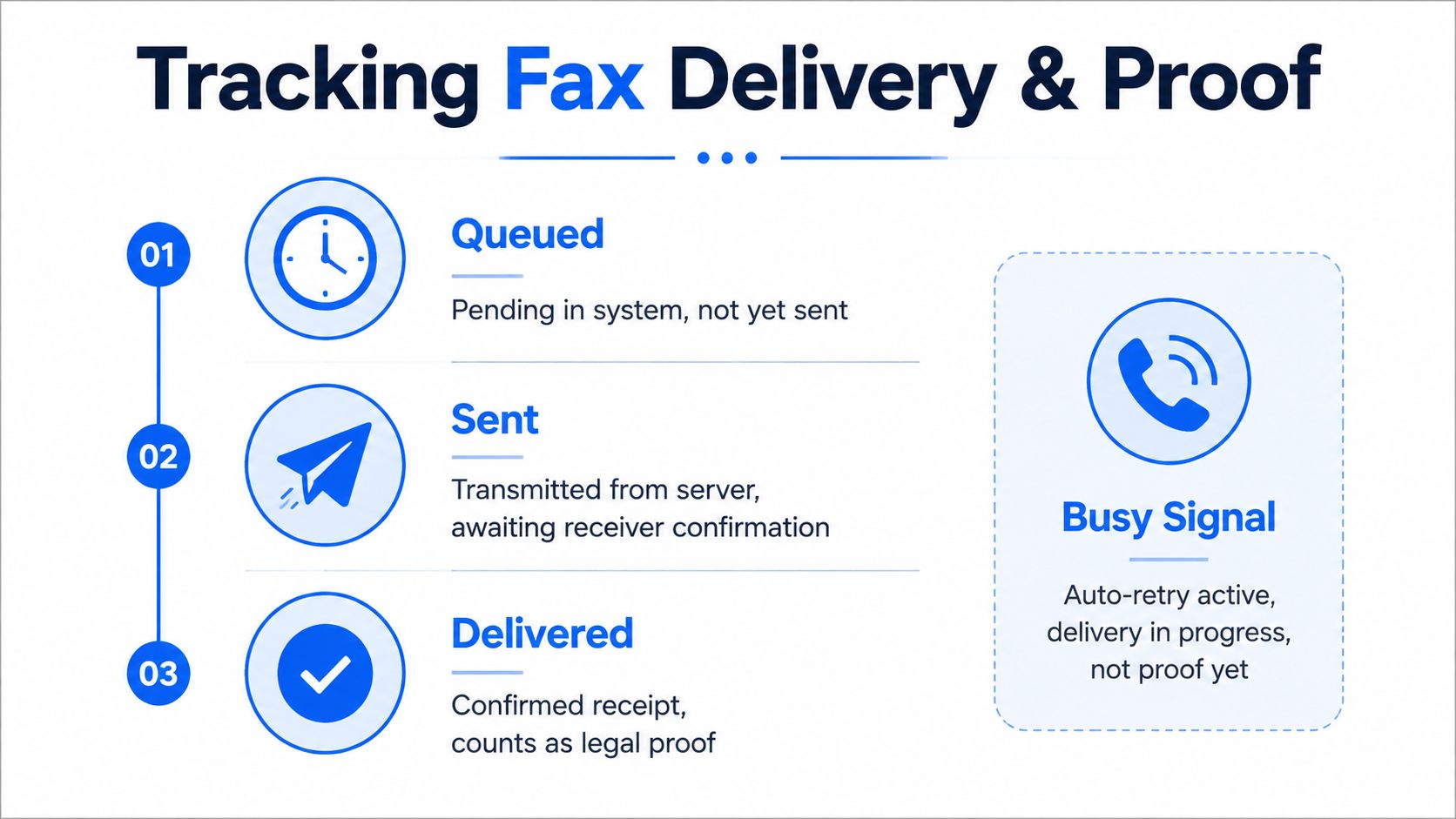
The live status page is the part that matters after you click send. Queued means the job is waiting in the system. Sent means the provider has pushed the fax into the network. Delivered is the state you want for proof, because that is the point where the recipient device reports success.
A busy signal is not the same thing as failure. If auto-retry is active, the job is still in progress, not dead, and you should wait for the final state before you resend. A hard failure is different, because a bad number, blocked line, or timeout means the destination needs to be fixed before you try again.
Save five things every time, the status URL, timestamp, page count, destination fax number, and transmission ID. That set gives you a usable record if somebody later asks what went out, when it went out, and where it went. For IRS submissions, archive the confirmation PDF and a screenshot for at least seven years. For contracts or court filings, keep them indefinitely.
That is not paranoia, it is discipline. If the status page says failed, do not panic or spam resend. Check the number, file size, and whether the line was busy, then re-dial with the same receipt trail.
The operational pattern matters here. One reliability summary found an average of 1.33 attempts per successful fax, and a 2025 peer-reviewed study of a healthcare fax workflow reported that automated retry logic cut failure rates from 37.7% to 9.9%, delivered 98.7% of faxes without manual resubmission, and needed just 1.11 attempts per successful delivery on average. That is why retry logic is part of the job.
Keep this rule: no status page, no proof.
If the fax is mission-critical, use support with the transmission ID in hand. Do not start with a vague complaint, start with the exact job record so someone can look at the send path and tell you whether the issue was the number, the line, or the recipient device.
If you need a clean record for taxes, legal paperwork, healthcare forms, or international sending, PerPageFax gives you live tracking and proof without requiring a monthly plan.
FAQ
Can I send a fax online without a fax machine?
Yes. You can send a fax online from a browser or phone without owning a fax machine. Most online fax services let you upload a PDF, DOC, DOCX, JPG, or HEIC file, enter the fax number, pay, and track the delivery.
What is the easiest way to send a fax from a computer?
The easiest method is usually browser-based web upload. If your document is already a PDF or Word file, you can upload it, enter the destination fax number, and send it without installing software.
Can I fax a document from my phone?
Yes. You can fax from a phone by uploading a document or taking a clear photo of a paper page. A mobile-friendly fax service can convert that image into a fax-ready file and send it to the recipient.
Is online faxing secure enough for sensitive documents?
It can be, if you use a provider that limits document retention, gives you delivery confirmation, and handles files in a controlled workflow. For legal, tax, and medical documents, always save the confirmation record.
Do I need a subscription to send a fax online?
No. Many people only need to fax occasionally, so pay-per-page sending is often the better choice. It avoids monthly fees, account setup, and renewal management.
Need to fax a document fast? PerPageFax lets you send from your browser or phone without a machine, account, or subscription. Upload your file, pay per page, and keep the confirmation receipt.
Ready to send a fax?
Send your fax online in minutes for $0.50/page — no account needed.
Send a fax now