September 15, 2026
Fax a PDF Without a Fax Machine, No Account
Upload your PDF to an online fax service, enter the recipient’s fax number with the correct country and area code, preview the pages, and hit send. You’ll get a delivery confirmation within minutes. No fax machine, no phone line, and with a pay-per-use service, no account or subscription is required either. PDF is the format to use because it holds its layout through the conversion.
TL;DR:
- Most pay-per-use fax services charge around $0.50 per page, with no account or subscription required for occasional documents.
- Confirm that the recipient’s fax number includes the correct country and area codes to avoid connection failures.
- Use PDF format with about 300 DPI for scans, combining multiple pages into one file and adding a clear cover sheet to streamline delivery.
- Ensure transmission security by checking for end-to-end encryption, delivery confirmation, and obtaining a business associate agreement for sensitive medical documents.
- Free or low-cost options may have limits on page count or attachment size, making pay-per-use preferable for infrequent faxes.
Quick Step-by-Step: Send a PDF From Your Computer or Cloud Storage
Sending a PDF by fax today has nothing to do with dial tones or curling thermal paper. An online fax service turns your file into telephony signals and transmits it to the recipient’s fax machine or online fax portal, and the whole process runs through a browser tab.
Here’s the sequence that gets a document delivered with the fewest surprises:
- Finalize the file. Open the PDF one last time and confirm the page count. Extra blank pages or a stray cover sheet from a prior job change what you owe, since most services bill per page.
- Open the send screen. Go to the provider’s fax page and attach the PDF directly from your computer or import it from cloud storage such as Google Drive or Dropbox.
- Enter the recipient number. Include the country code and area code, not just the local digits. A dropped area code is one of the most common reasons a fax bounces.
- Add a cover page if the recipient needs context. Many services generate one automatically with your name, date, and page count filled in.
- Preview before you submit. Check that pages aren’t cut off or rotated. A quick preview here saves a second $0.50-per-page charge later.
- Submit and watch for confirmation. A completed send typically returns a status update and confirmation within a few minutes.
Page count and attachment size are what drive the price on a pay-per-use service. Pricing is typically based per page, so shorter PDFs cost less than longer bundles of exhibits, reflecting the flat per-page pricing model.
Alternative Ways to Send a Fax: Email, Mobile Scan, and Local Scanning
The web portal isn’t the only route. Reviewers covering online fax tools consistently point to email-to-fax and web upload as the two dominant methods people actually use, and each fits a different situation.
- Email-to-fax: Address an email to the recipient’s fax number at the provider’s fax domain (something like 15551234567@faxprovider.com), attach the PDF, and hit send. Good for anyone who lives in their inbox and doesn’t want to open another tool.
- Mobile scan-and-send: Use your phone’s camera or a scanning app to capture paper documents at around 300 DPI, save as a PDF, then send it through the provider’s app or mobile site. This is the move when the original document only exists on paper.
- Send the digital file directly: If the PDF already exists on your device, skip scanning entirely and upload it straight to the send screen.
- Watch the limits: Some free tiers cap attachment size or page count, and a handful of services still require account creation before they’ll let a file through the door.
Pick the method that matches what you’re starting with, not the one that feels most familiar.
Preparing Your PDF: Format, Compression, and Cover Pages
Stick with PDF whenever you have the choice. It’s the format practical how-to guides recommend because it holds formatting through conversion better than Word documents or image files, which means fewer surprises on the receiving end.
If you’re scanning from paper, aim for about 300 DPI, and keep text-heavy pages in black-and-white or grayscale. Grayscale scans stay legible while keeping the file size down, which matters when you’re paying by the page or working around an attachment limit.
Combine multi-page documents into a single PDF rather than sending five separate files. A tool like PerPageFax’s free PDF prep tool can merge pages, compress an oversized file, and get scattered documents into one fax-ready PDF. Add a cover page up front listing the recipient’s name, your callback number, and total page count. It helps route the fax correctly on the receiving end, especially in a shared office fax line.
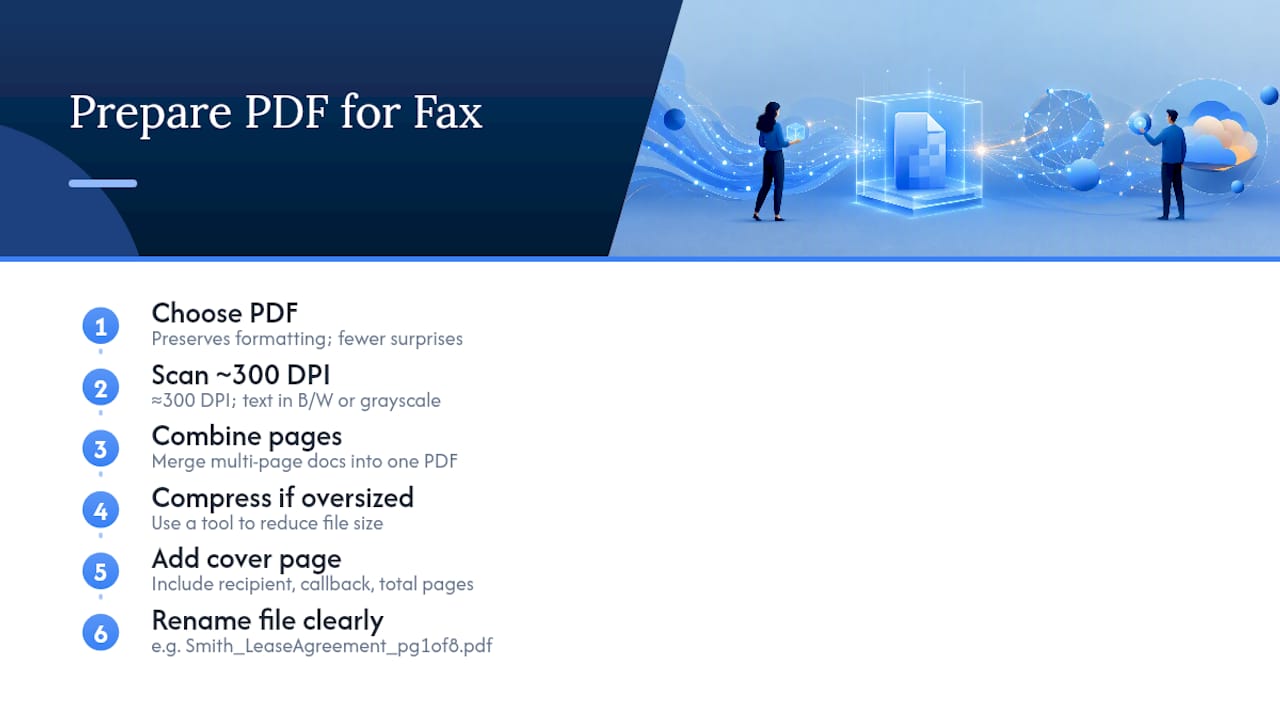
Pro Tip: Name your file clearly before you upload it, like “Smith_LeaseAgreement_pg1of8.pdf.” A vague filename like “scan001.pdf” is easy to misfile once it lands in someone else’s inbox or fax queue.
Is It Safe to Fax Sensitive PDFs? Security Checklist
Sensitive documents — medical records, signed contracts, tax forms — need more than a fast send. Check that the connection uses TLS encryption during transmission and that stored faxes sit behind real access controls, not just a login screen.
Delivery confirmations and audit trails matter beyond peace of mind. They’re often what makes a faxed document hold up as a legal record under frameworks like the ESIGN Act in the US or eIDAS in the EU, since both rely on a verifiable trail showing when and to whom something was sent.
If you’re in healthcare, ask whether the provider offers a HIPAA-ready workflow and will sign a business associate agreement (BAA) before you send anything containing patient information.
Before faxing anything sensitive, confirm:
- The transmission is encrypted end to end, not just on the upload step.
- The service generates a timestamped delivery confirmation you can save.
- Stored files have a defined retention window, not indefinite storage.
- You can request a BAA if the document is medical in nature.
Pay-Per-Use vs. Subscription: What Actually Costs Less
The math here is simple once you know your own volume. Pay-per-page pricing suits occasional senders, while a monthly subscription tends to pay off only once you’re sending in real volume every week.
- Pay-per-page: You pay for what you send and nothing else. PerPageFax runs this model at a flat $0.50 per page, with no account setup and no recurring charge sitting on your card.
- Subscription plans: Make sense for offices sending dozens of faxes a month, since the per-fax cost drops once volume climbs high enough.
- Watch for extras: International numbers, automatic retries on a failed send, and cover-page add-ons are common places subscription and pay-per-use services alike tack on fees.
- Free tiers exist but come with limits: Expect caps on page count or monthly sends, which is fine for a single one-off fax but not a real substitute for occasional professional use.
If you fax two or three times a year, a $10 monthly plan is money spent on faxes you never send.
How to Confirm Delivery and Fix a Failed Fax
A delivery receipt shows the timestamp, the recipient’s fax number, and a status flag confirming the pages went through. That receipt is your proof the document arrived, not just that you clicked send.
When a fax fails, the fix is usually one of these:
- Check the number format first. Missing country or area codes cause more failures than any technical glitch.
- Retry on a busy signal. Most services queue an automatic retry within minutes; give it one cycle before troubleshooting further.
- Re-scan low-quality pages. A scan under 300 DPI sometimes gets rejected by the receiving machine.
- For international sends, double-check the country code and allow a slightly longer window before assuming failure.
- Contact support with specifics if it still fails: the recipient number, the timestamp of your attempt, and the error message shown.
Why We Built a No-Account, Pay-Per-Use Fax Option
Most people who need to fax a document need it done once, correctly, and without signing up for something they’ll forget to cancel. That’s the entire reasoning behind PerPageFax’s pricing.
Three things anchor that approach: no account required to send a single PDF, a flat $0.50 per page with nothing hidden underneath it, and free tools like the PDF faxifier and cover-sheet builder so prep doesn’t cost extra. If you’re sending an IRS form or a signed lease once this year, a subscription model was never built for you.
— Engin
Send Your First PDF With PerPageFax Right Now
An alternative to a monthly fax subscription is to upload your PDF, pay a flat fee per page, and skip the account setup entirely. No plan to remember to cancel, no minimum commitment, just a document sent and confirmed.
The send flow takes a few minutes from start to finish. Head to the main send page, attach your PDF, enter the recipient’s number with the right country code, and submit. If your document needs cleanup first, run it through the free Faxify tool to combine pages or shrink an oversized file, and build a matching cover sheet in the same visit. Sending internationally? PerPageFax covers 35 countries under the same flat rate.
Every fax comes with delivery confirmation, and a failed send is refunded in full automatically. Start your send now and you’ll have a confirmed delivery before your coffee gets cold.
Sources
- How to fax from a computer: Send documents quickly and securely | Zoom
- How to send or receive a fax online | PCMag
- How to Send a PDF by Fax Online: 2026 Guide | pdfFiller Blog
FAQ
How Can I Fax a PDF for Free?
Several online fax services offer a limited free tier, usually capped at a handful of pages per month, while pay-per-use services like PerPageFax charge a flat $0.50 per page with no free allotment but also no subscription commitment.
Can I Fax a PDF From Gmail?
Yes. Address an email to the recipient’s fax number at the provider’s designated fax domain, attach the PDF, and send it. The provider converts the email into a fax transmission automatically.
Can I Send a PDF From My Computer to a Fax Machine?
Yes. An online fax service converts your PDF into telephony signals that a standard fax machine can receive, so no fax hardware is required on your end.
What’s the Best Way to Send a Large PDF File by Fax?
Compress the file or split it into smaller sections before sending, since most services cap attachment size and charge by page count regardless of file size. Tools like PerPageFax’s free PDF prep tool can shrink or merge files before you submit.
How Do I Format a Recipient’s Fax Number Correctly?
Always include the country code followed by the area code, then the local number. Skipping the country code is one of the most common reasons an otherwise valid fax fails to connect.
Recommended
Ready to send a fax?
Send your fax online in minutes for $0.50/page — no account needed.
Send a fax now