September 17, 2026
Skip the App: Secure Fax From Your Cell Phone
You can fax from your phone using a mobile fax app, a browser-based no-account web fax, or email-to-fax. For a one-off, urgent fax, a no-account, pay-per-use web fax like PerPageFax is usually the fastest route, since it skips downloads and sign-ups. Expect a small free allowance from most apps, with per-page pricing (often around $0.50 a page) covering everything beyond that.
TL;DR:
- Using a no-account web fax service like PerPageFax is ideal for urgent, one-time faxes at a flat rate of $0.50 per page, with no sign-up required.
- Mobile fax apps are best suited for frequent users who want a dedicated number, inbox, and message history, making them cost-effective for regular faxing.
- Sending a fax via email requires an already established gateway address and careful formatting of the subject line to ensure successful delivery.
- A clear, high-quality PDF file prepared with good lighting and proper cropping significantly impacts the chances of successful transmission and readability.
- Always preview your converted PDF before paying and save the delivery confirmation to avoid disputes or proof of successful delivery.
Which Fax From Cell Phone Method Fits Your Situation?
The right method depends on how often you fax and how much setup you’re willing to do. A mobile fax app makes sense if you need a dedicated fax number or expect to send and receive faxes regularly, since it keeps a running history and often assigns you a permanent number. A browser-based no-account web fax service works best for a single urgent document, because there’s nothing to install and no account to create before you can send. Email-to-fax fits people who already live in their inbox and have been given a gateway address by a recipient’s office or their own provider.
Here’s how the three stack up:
- Mobile fax apps: best for repeat senders who want an inbox, sent-item history, and a dedicated number.
- Browser-based no-account fax: best for one-time, urgent faxes from any phone, no install required.
- Email-to-fax: best when you already have a working gateway address and want to send without opening a new tool.
The one-line rule: if you’ll fax more than once a month, get an app; if this is a single document you need gone in the next ten minutes, use a no-account web service.
How to Send a Fax From Your Phone, Step by Step
Before you start, confirm three things: a working internet connection, a document in a readable format (a photographed page works, but a clean PDF works better), and the recipient’s fax number written in the correct format, usually the area code plus a seven-digit number, sometimes with a country code for international sends. Verizon’s own guide to faxing from a phone confirms that both apps and cloud file uploads are standard, supported workflows on modern smartphones.
Web, no-app flow:
- Open the fax service in your phone’s browser.
- Upload a file from your camera roll or pick one from cloud storage.
- Enter the recipient’s fax number carefully, digit by digit.
- Add a cover sheet if the recipient requires one.
- Preview the page count and cost before paying.
- Send, then wait for a delivery confirmation notification.
Mobile app flow:
- Open the app and choose scan or attach.
- Crop, rotate, or merge pages as needed.
- Enter the recipient’s number, or select it from a saved contact.
- Send the fax.
- Check the app’s status screen for delivery confirmation.
Email-to-fax flow:
- Attach your document to a new email.
- Format the subject line exactly as the gateway requires, since many services parse the fax number from that line.
- Send the email to the gateway address.
- Watch for a confirmation reply, and note that formatting mistakes are the most common reason these faxes fail.
Pro Tip: Save a screenshot or PDF of your delivery confirmation the moment it arrives. If a recipient later claims they never got your fax, that timestamped receipt is the only proof you have.
If a fax fails, run through this checklist first: wrong or transposed digits in the fax number, a file that exceeds the service’s size limit, or a format the service doesn’t accept (some tools reject HEIC images or password-protected PDFs).
What Does It Cost to Fax From a Phone?
Most fax apps advertise a small free allowance, often the first page or a handful of pages each month, and that free tier usually comes with tradeoffs: watermarks, ads, or a forced sign-up before you can send anything else. Beyond that allowance, apps and web services typically shift to either a monthly subscription or per-page pricing.
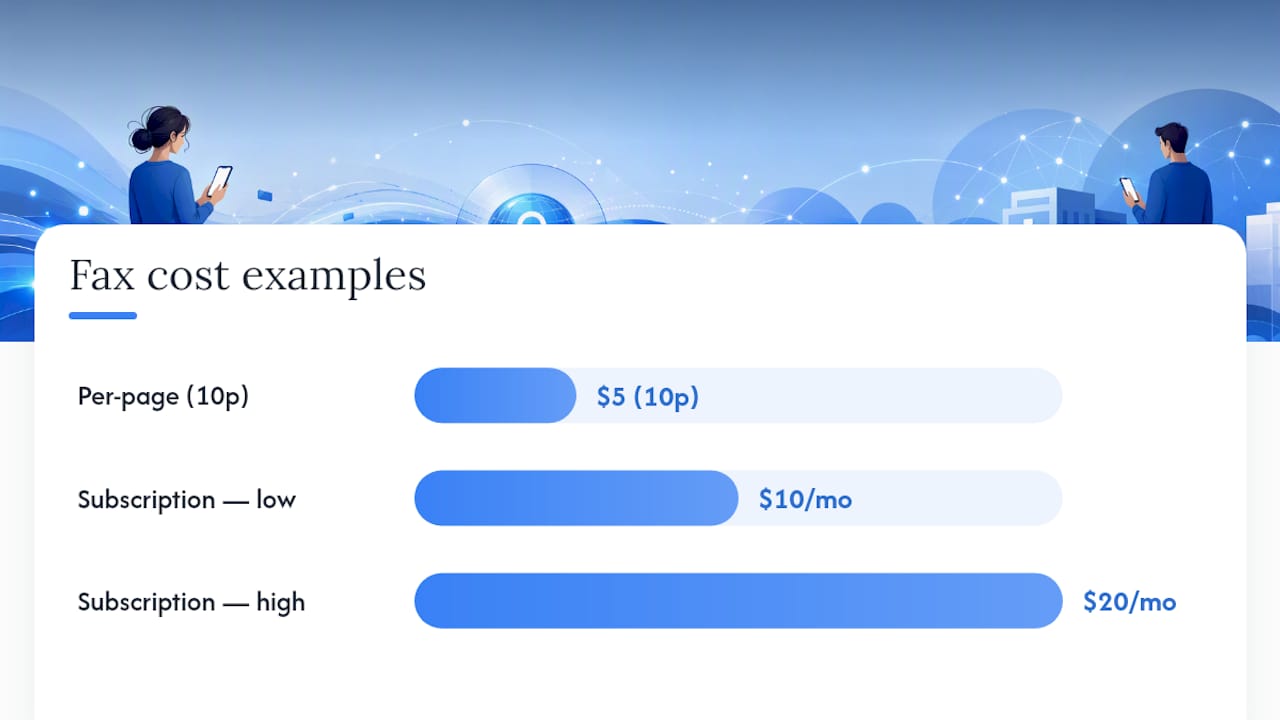
The math matters here. Sending a 10-page fax at $0.50 per page on PerPageFax’s pay-per-use pricing comes to $5.00 total, no account and no recurring charge attached. Compare that to a subscription plan, which might run $10 to $20 a month regardless of whether you send one fax or fifty. A subscription only pays off if you’re faxing often enough to use it every month.
- Free tiers: fine for a single, low-stakes page; watch for watermarks and mandatory sign-ins.
- Pay-per-use: best for occasional, urgent sends where you know the exact page count.
- Subscription: best if you fax weekly or run a business that depends on it.
Before you send anything, confirm the price shown matches your actual page count. Most reputable services show that total before you pay, not after.
Prepping Your File and Protecting What’s Inside It
A blurry photo turns into an unreadable fax on the other end, so file prep matters as much as the sending method. PDF is the preferred format for almost every fax service, since it holds its formatting regardless of the recipient’s fax machine or software. If you’re scanning with your phone’s camera, use good, even light, crop tightly to the page edges, and bump up the contrast so text doesn’t fade into a gray background. Android’s own camera documentation lists document scanning among the camera’s core use cases and covers the permissions scanning apps need to turn a phone photo into a clean, fax-ready PDF.
- Use PDF over JPEG or HEIC whenever the service allows it.
- Scan in daylight or bright indoor light, and avoid shadows across the page.
- Crop out background clutter before merging multiple pages into one file.
- Merge related pages into a single document instead of sending several separate files.
Encryption and delivery confirmation matter most when the document is legal, medical, or financial. A tax form or a signed contract needs proof it arrived, and it needs to travel in a way that isn’t easily intercepted. That’s a case for an encrypted, tracked service rather than email-to-fax, which offers neither by default. Google’s own privacy and data-handling policies are worth a look if you’re deciding whether to scan sensitive material inside an app versus preparing it offline first. If you’re sending anything covered by health or financial privacy rules, check the provider’s compliance claims before you trust it with that document.
What I’d Actually Tell You to Do
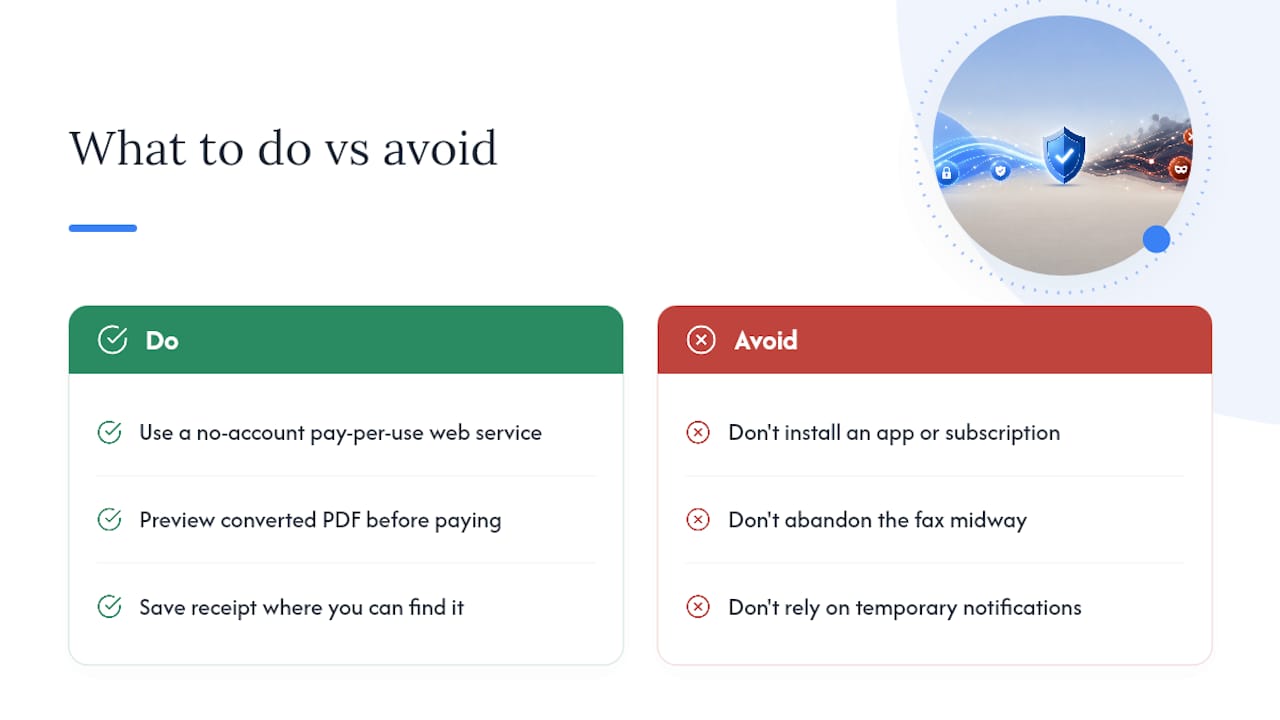
For a one-off fax, skip the app store entirely and use a no-account, pay-per-use web service. Installing an app, creating a login, and setting up a subscription for a document you’ll send once a year is friction you don’t need, and most people who go that route end up abandoning the fax halfway through.
My one insider tip: always preview the converted PDF before you pay. Services convert your photo or file into their own format, and occasionally a page gets cropped or a scan comes out darker than expected. Catching that before you send saves you a second charge and a second wait for confirmation. Once it’s sent, save the delivery receipt somewhere you’ll actually find it again, not just in a notification that disappears in an hour.
— Engin
Send a Fax From Your Phone With PerPageFax
PerPageFax is built for exactly the scenario this article covers: a document that needs to go out now, without a subscription attached to it. There’s no account to create, pricing is a flat $0.50 per page with no hidden fees, and every fax gets automatic retries plus encryption on the way out.
The flow is simple: upload your PDF from your phone, enter the recipient’s fax number, pay for the exact page count shown, and get a delivery confirmation when it goes through. If your file needs cleanup first, PerPageFax’s free tools let you faxify a PDF or build a cover sheet before you send. Ready to send that document? Head to the PerPageFax send page and get it delivered in the next few minutes.
Sources
Verizon’s guide to faxing from a phone covers the basic mobile workflows referenced throughout this article, including app-based and cloud-upload methods. Google’s privacy policy explains the data controls relevant to any scanning or fax app that touches your camera roll. For readers who want to go deeper on mobile PDF creation, PerPageFax’s guide to creating a PDF on iPhone and its full step-by-step mobile fax guide both expand on the steps condensed here.
FAQ
Can I Fax From My Cell Phone for Free?
Yes, many services let you send a first page free, though most attach a watermark or require sign-up before you can send more. Beyond that limited allowance, expect per-page pricing, such as PerPageFax’s $0.50 per page with no account required.
Can I Send a Fax From Gmail for Free?
Gmail itself doesn’t fax anything. You need an email-to-fax gateway address, and while some gateways offer a small free allowance, most require a paid plan once you go beyond a page or two.
Can You Send a Fax From a Mobile Phone?
Yes, this is now standard. You can use a dedicated fax app, a browser-based no-account web service, or an email-to-fax gateway, and Verizon’s own mobile guide confirms both apps and cloud uploads work reliably from a smartphone.
How Can I Send a Fax Without a Landline for Free?
You don’t need a landline at all anymore. A no-account web fax service or a mobile app handles the transmission over the internet, and most offer a small free page allowance before switching to per-page or subscription pricing.
Recommended
Ready to send a fax?
Send your fax online in minutes for $0.50/page — no account needed.
Send a fax now